SilverStack CI/CD Stack: Infrastructure and Orchestration
This runbook describes how the SilverStack CI/CD stack is composed and provisioned on iximiuz Labs using a single manifest and four custom rootfs images. It covers infrastructure topology, node roles, resource allocation, manifest structure, Dev Machine behavior, and connectivity verification.
Operational configuration inside Jenkins, SonarQube, and Nexus (credentials, webhooks, repositories) is covered in Self-Hosted CI/CD Stack: Operations.
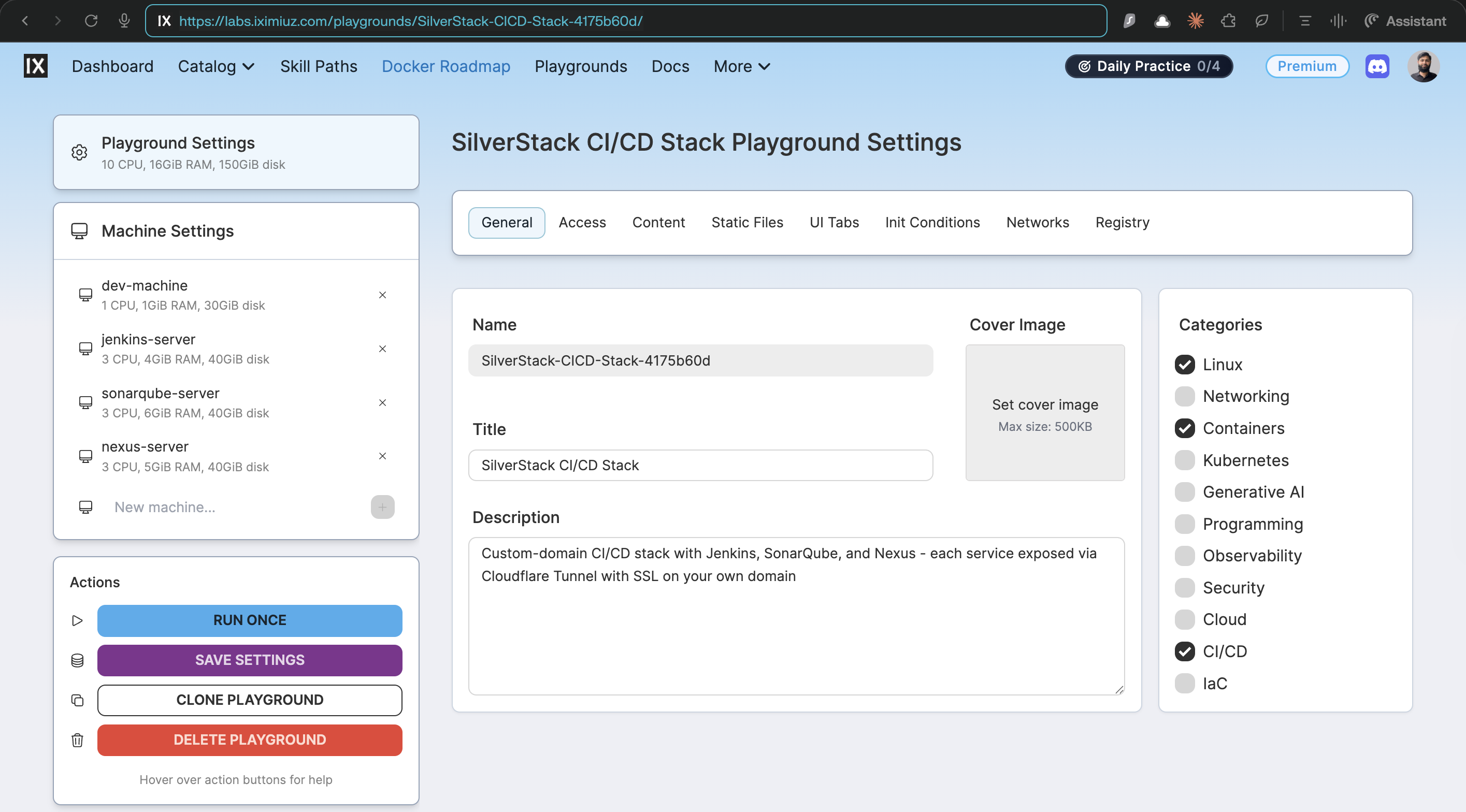
Quick Start
Skip the manifest and try the whole stack now: Launch CI/CD Stack ↗. Click Start, and all four nodes (Dev Machine, Jenkins, SonarQube, Nexus) boot together in the browser. The rest of this page covers how the stack is composed and provisioned.
Prerequisites
- iximiuz Labs account with labctl installed and authenticated.
- Four rootfs images published to GHCR (built via their respective GitHub Actions workflows in silver-stack):
| Image | Built by |
|---|---|
ghcr.io/ibtisam-iq/dev-cicd-rootfs:latest | .github/workflows/build-dev-cicd-rootfs.yml |
ghcr.io/ibtisam-iq/jenkins-rootfs:latest | .github/workflows/build-jenkins-rootfs.yml |
ghcr.io/ibtisam-iq/sonarqube-rootfs:latest | .github/workflows/build-sonarqube-rootfs.yml |
ghcr.io/ibtisam-iq/nexus-rootfs:latest | .github/workflows/build-nexus-rootfs.yml |
High-Level Architecture
The entire stack is declared in a single iximiuz manifest: iximiuz/manifests/cicd-stack.yml.
All four machines share a local network (172.16.0.0/24) and run within one Flexbox playground.
Node Roles and Resource Allocation
| Node | Image | CPU | RAM | Disk | Role |
|---|---|---|---|---|---|
dev-machine | dev-cicd-rootfs | 1 vCPU | 1 GiB | 30 GiB | Jump host / DevOps workstation; entry point into the stack |
jenkins-server | jenkins-rootfs | 3 vCPU | 4 GiB | 40 GiB | Jenkins LTS CI/CD orchestrator |
sonarqube-server | sonarqube-rootfs | 3 vCPU | 6 GiB | 40 GiB | SonarQube 26.2 CE + PostgreSQL 18 |
nexus-server | nexus-rootfs | 3 vCPU | 5 GiB | 40 GiB | Nexus 3.89.1 CE artifact registry |
Flexbox Resource Budget
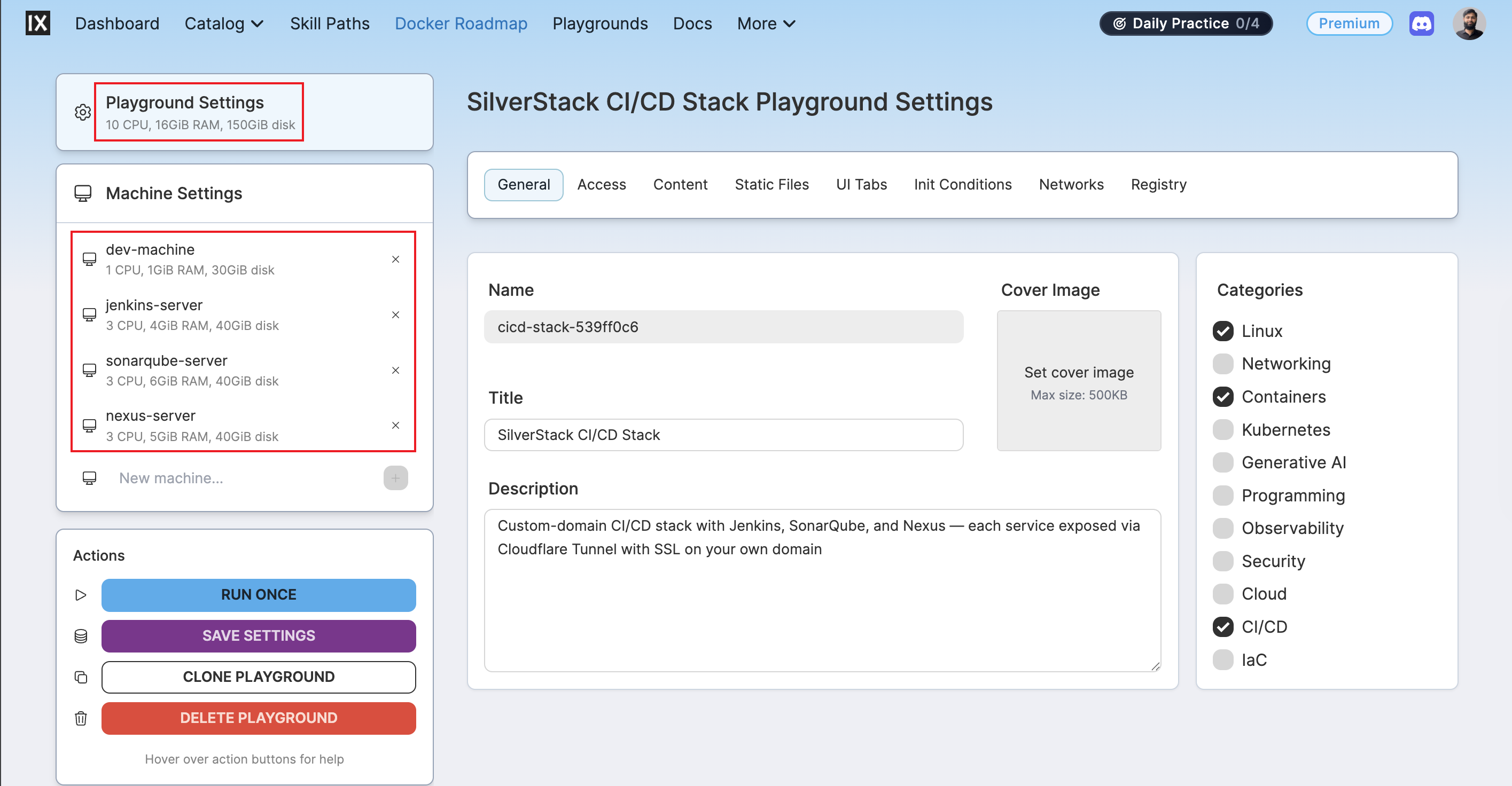
The Flexbox playground type provides a shared pool of 10 vCPUs, 16 GiB RAM, and 150 GiB disk across all machines. The allocation above sums to exactly those limits:
dev-machinegets the smallest slice (1 vCPU, 1 GiB): it runs no services; SSH aliases and IDE only.jenkins-servergets 4 GiB RAM for build concurrency and the Jenkins plugin ecosystem.sonarqube-servergets the largest RAM allocation (6 GiB): SonarQube embeds Elasticsearch alongside PostgreSQL; both are memory-intensive.nexus-servergets 5 GiB RAM and the full 40 GiB disk to accommodate Maven, npm, and Docker artifact storage growth.- Total disk: 30 + 40 + 40 + 40 = 150 GiB exactly.
Playground Tabs
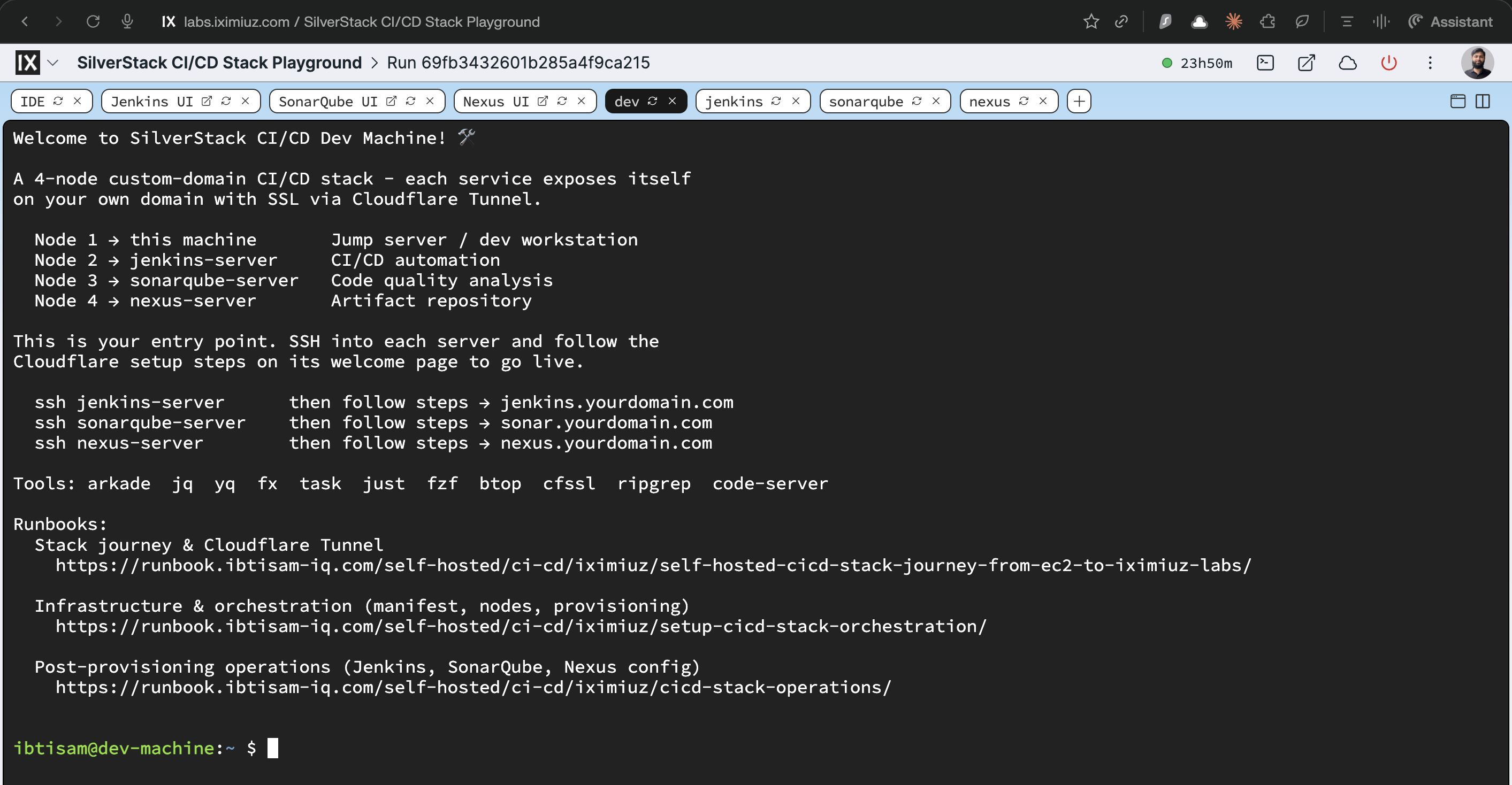
The manifest pre-defines 8 tabs:
| Tab | Kind | Machine |
|---|---|---|
| IDE | ide | dev-machine |
| dev | terminal | dev-machine |
| jenkins | terminal | jenkins-server |
| sonarqube | terminal | sonarqube-server |
| nexus | terminal | nexus-server |
| Jenkins UI | http-port: 80 | jenkins-server |
| SonarQube UI | http-port: 80 | sonarqube-server |
| Nexus UI | http-port: 80 | nexus-server |
All three UI tabs use port 80: they open the Nginx reverse proxy, not the service ports directly.
Dev CI/CD Machine Rootfs
The Dev Machine is the entry point into the stack. It runs no services: it is a jump host and DevOps workstation. Its rootfs lives under iximiuz/rootfs/dev/ci-cd/.
Source Layout
Dockerfile Behavior
The Dockerfile is intentionally minimal: no services, no systemd units, no installs:
FROM ghcr.io/ibtisam-iq/ubuntu-24-04-rootfs:latest

ARG USER, BUILD_DATE, VCS_REF
LABEL org.opencontainers.image.created="${BUILD_DATE}"
      org.opencontainers.image.revision="${VCS_REF}"

USER $USER
ENV HOME=/home/$USER

COPY welcome $HOME/.welcome
RUN --mount=type=bind,source=scripts,target=/tmp/scripts \
    bash /tmp/scripts/customize-bashrc.sh

EXPOSE 22
Key points:
- No
USER rootat the end: unlike the service rootfs images, this image does not return toroot. There is noCMDin the Dockerfile, and none is inherited either, becauseubuntu-24-04-rootfsdoes not set one. The platform boots the filesystem with its own kernel and starts systemd as PID 1 regardless, so aCMDwould only affectdocker run, which this image is not built for. The service images setCMD ["/lib/systemd/systemd"]for exactly that reason: to makedocker runfail honestly rather than drop you into a shell. - No
SONARQUBE_PORT,NEXUS_PORT, or service-specific build args: the only build arg consumed isUSER=ibtisam. - All tools inherited from
ubuntu-24-04-rootfs:arkade,jq,yq,fx,task,just,fzf,btop,cfssl,ripgrep,code-server, and all base CLI tools.
Welcome Banner
The banner (~/.welcome) explains the stack topology and directs the user to each service node:
Welcome to SilverStack CI/CD Dev Machine! 🛠️

  Node 1 → this machine       Jump server / dev workstation
  Node 2 → jenkins-server     CI/CD automation
  Node 3 → sonarqube-server   Code quality analysis
  Node 4 → nexus-server       Artifact repository

  ssh jenkins-server      then follow steps → jenkins.yourdomain.com
  ssh sonarqube-server    then follow steps → sonar.yourdomain.com
  ssh nexus-server        then follow steps → nexus.yourdomain.com
Bash Aliases
customize-bashrc.sh appends to ~/.bashrc:
alias stack-jenkins='ssh -o StrictHostKeyChecking=no ibtisam@jenkins-server'
alias stack-sonarqube='ssh -o StrictHostKeyChecking=no ibtisam@sonarqube-server'
alias stack-nexus='ssh -o StrictHostKeyChecking=no ibtisam@nexus-server'
Note
-o StrictHostKeyChecking=no is intentional: iximiuz microVM SSH host keys are ephemeral and regenerated at every boot. Strict key checking would prompt on every new playground creation.
CI Workflow
ghcr.io/ibtisam-iq/dev-cicd-rootfs is built by .github/workflows/build-dev-cicd-rootfs.yml.
- Triggers on changes under
iximiuz/rootfs/dev/ci-cd/**(excludingREADME.md) and on edits to the workflow file. platforms: linux/amd64only (QEMU intentionally omitted).- Tags:
latest,sha-<short>,YYYY-MM-DD. - Build arg passed:
USER=ibtisam. BUILD_DATEandVCS_REFare not passed as explicitbuild-args: same known gap as other rootfs images.
Provisioning the Playground
Quickest path
Open the playground directly in the browser and click Start Playground: https://labs.iximiuz.com/playgrounds/SilverStack-CICD-Stack-1766a8a1 No local tools required. The labctl steps below are for launching via manifest.
Step 1: Create the Stack
From a machine where labctl is authenticated and the silver-stack repo is cloned:
labctl playground create --base flexbox SilverStack-CICD-Stack \
  -f iximiuz/manifests/cicd-stack.yml
This command:
- Creates a playground titled
SilverStack CI/CD Stack - Defines the
localnetwork at172.16.0.0/24 - Boots all four machines with their respective rootfs images, resource limits, and disk allocations
Output:
Creating playground from /Users/ibtisam-iq/gitHub/silver-stack/iximiuz/manifests/cicd-stack.yml
Playground URL: https://labs.iximiuz.com/playgrounds/SilverStack-CICD-Stack-1766a8a1
SilverStack-CICD-Stack-1766a8a1
Note
Custom playgrounds created via labctl appear under Playgrounds → My Custom in the iximiuz dashboard, not under "Running".
Step 2: Verify Tabs and Connectivity
After the playground comes up:
- Open the IDE and dev terminal tabs for
dev-machine. Confirm the welcome banner appears on login. - From the Dev Machine terminal, use the stack aliases to verify SSH:
- Confirm the HTTP tabs (Jenkins UI, SonarQube UI, Nexus UI) load on port 80 via Nginx.
Step 3: Verify Each Node's Services
SSH into each service node and run the health checks:
# Jenkins
ssh jenkins-server
systemctl is-active lab-init nginx jenkins     # all three: active
curl -f http://localhost/health                 # healthy

# SonarQube
ssh sonarqube-server
systemctl is-active lab-init postgresql nginx sonarqube   # all four: active
curl -f http://localhost/health                             # healthy

# Nexus
ssh nexus-server
systemctl is-active lab-init nginx nexus       # all three: active
curl -f http://localhost/health                # healthy
Note
SonarQube takes 2–3 minutes to fully initialize. systemctl status sonarqube may show activating during this period.
Node Networking
Intra-Stack Networking
All four machines share the local network (172.16.0.0/24) and can reach each other by hostname:
# From jenkins-server
ping sonarqube-server    # should respond
ping nexus-server        # should respond
ping dev-machine         # should respond
Jenkins pipelines can reach SonarQube and Nexus by hostname for internal communication, or by their public custom domains once Cloudflare Tunnels are configured.
External Access via Cloudflare Tunnel
Each service node has cloudflared pre-installed. To expose a service publicly:
# On each service node, run the install command from Cloudflare dashboard
sudo cloudflared service install <token-from-cloudflare-dashboard>
Then configure a published application route in the Cloudflare dashboard pointing to localhost:80.
See the journey runbook for the full NAT explanation and Cloudflare Tunnel setup walkthrough.
Next Steps
Once all nodes are reachable and healthy, switch to Self-Hosted CI/CD Stack: Operations for:
- Jenkins post-setup: pipeline tools, plugins
- Credentials: SonarQube, GitHub, Docker Hub, Nexus, GHCR
- SonarQube Scanner configuration in Jenkins
- SonarQube webhook
- Nexus Maven
settings.xmland Docker hosted repository setup
Related
- Journey runbook: NAT, Cloudflare Tunnel, rootfs evolution
- Self-Hosted CI/CD Stack: Operations: post-provisioning operational config
- Jenkins Rootfs runbook
- SonarQube Rootfs runbook
- Nexus Rootfs runbook
- Dev CI/CD Rootfs runbook: the jump-host image running on this stack's
dev-machinenode - Dev Machine Rootfs runbook: the standalone full-toolchain workstation, a different image
- cicd-stack.yml manifest