Phases 0-3: Prerequisites & AWS Infrastructure Setup
Lab Context
I executed this entire deployment inside KodeKloud's AWS Playground - a time-boxed AWS environment with a real account, real services, but a restricted IAM user. No personal AWS account was used.
Running EKS on this playground comes with non-trivial IAM permission gaps (e.g., no iam:PassRole, no iam:PutRolePolicy in some contexts). The workarounds for those restrictions are documented in a dedicated runbook: EKS on KodeKloud AWS Playground via eksctl →
Account identifiers in this runbook
Account IDs, access key IDs, certificate ARNs and hosted zone IDs are shown as placeholders such as <account-id> rather than as captured values.
Where a command exports ACCOUNT_ID, subsequent commands use the variable. Substitute the values and the sequence runs unchanged.
Dev Machine
I used SilverStack Dev Machine - a custom root filesystem on iximiuz Labs, which I maintain with all DevOps tools pre-installed (kubectl, eksctl, terraform, helm, helmfile, aws cli, etc.). No local machine setup is required.
Configure AWS CLI
aws configure
# AWS Access Key ID:     <access-key-id>
# AWS Secret Access Key: <secret-access-key>
# Default region name:   us-east-1
# Default output format: json
Clone Repo & Set Env Vars
git clone https://github.com/ibtisam-iq/retail-store-sample-app.git
cd retail-store-sample-app

CLUSTER_NAME=ibtisam-iq-eks-cluster
REGION=us-east-1
export ACCOUNT_ID=$(aws sts get-caller-identity --query Account --output text)
echo $ACCOUNT_ID   # <account-id>
Phase 1 - IAM Roles for EKS Cluster via Terraform
Why Terraform instead of eksctl?
The lab IAM user does not have iam:PassRole permission, which eksctl create cluster triggers internally when it creates and assigns roles. Creating the roles with Terraform beforehand - and then referencing them in cluster.yaml - avoids that permission entirely.
For more information, see Terraform Code for IAM Roles for EKS Cluster
Write main.tf
resource "aws_iam_role" "eks_cluster_role" {
  name = "eksClusterRole"
  assume_role_policy = jsonencode({
    Version = "2012-10-17"
    Statement = [{
      Action    = "sts:AssumeRole"
      Effect    = "Allow"
      Principal = { Service = "eks.amazonaws.com" }
    }]
  })
}

resource "aws_iam_role" "eks_node_role" {
  name = "eksNodeRole"
  assume_role_policy = jsonencode({
    Version = "2012-10-17"
    Statement = [{
      Action    = "sts:AssumeRole"
      Effect    = "Allow"
      Principal = { Service = "ec2.amazonaws.com" }
    }]
  })
}

resource "aws_iam_role_policy_attachment" "eks_cluster_policy" {
  policy_arn = "arn:aws:iam::aws:policy/AmazonEKSClusterPolicy"
  role       = aws_iam_role.eks_cluster_role.name
}

resource "aws_iam_role_policy_attachment" "node_worker_policy" {
  policy_arn = "arn:aws:iam::aws:policy/AmazonEKSWorkerNodePolicy"
  role       = aws_iam_role.eks_node_role.name
}

resource "aws_iam_role_policy_attachment" "node_cni_policy" {
  policy_arn = "arn:aws:iam::aws:policy/AmazonEKS_CNI_Policy"
  role       = aws_iam_role.eks_node_role.name
}

resource "aws_iam_role_policy_attachment" "node_ecr_policy" {
  policy_arn = "arn:aws:iam::aws:policy/AmazonEC2ContainerRegistryReadOnly"
  role       = aws_iam_role.eks_node_role.name
}

resource "aws_iam_role_policy_attachment" "node_ssm_policy" {
  policy_arn = "arn:aws:iam::aws:policy/AmazonSSMManagedInstanceCore"
  role       = aws_iam_role.eks_node_role.name
}
Apply
terraform init
terraform apply -auto-approve
# Apply complete! Resources: 7 added, 0 changed, 0 destroyed.
Result: eksClusterRole and eksNodeRole created with all required policy attachments.
Phase 2 - EKS Control Plane via eksctl
Write cluster.yaml
apiVersion: eksctl.io/v1alpha5
kind: ClusterConfig

metadata:
  name: ibtisam-iq-eks-cluster
  region: us-east-1
  version: "1.34"

iam:
  serviceRoleARN: arn:aws:iam::<account-id>:role/eksClusterRole
  withOIDC: false  # OIDC associated manually in the next step

accessConfig:
  authenticationMode: API_AND_CONFIG_MAP

addons:
  - name: vpc-cni
    version: latest
  - name: kube-proxy
    version: latest
  - name: coredns
    version: latest

managedNodeGroups: []

autoModeConfig:
  enabled: false
No OIDC in cluster.yaml
withOIDC: false is intentional. Enabling OIDC in the cluster config causes eksctl to call iam:PassRole during cluster creation, which fails under the lab user's permissions. OIDC is associated manually after the cluster is up.
Create Cluster
eksctl automatically provisioned:
- VPC with public/private subnets in
us-east-1dandus-east-1b - EKS addons:
vpc-cni,kube-proxy,coredns,metrics-server - kubeconfig saved to
~/.kube/config
Associate OIDC Provider
# Step 2: Associate OIDC provider manually
eksctl utils associate-iam-oidc-provider \
  --cluster $CLUSTER_NAME \
  --region $REGION \
  --approve
# ✔  created IAM Open ID Connect provider for cluster "ibtisam-iq-eks-cluster"
Phase 3 - Self-Managed Worker Nodes via CloudFormation
Why Self-Managed Nodes?
Managed node groups are the standard way to run worker nodes in EKS, but they come with a catch:
- They create a full IAM role and attach it automatically, which fails under the lab user's IAM permissions (no
iam:PassRole). - eksctl creates them behind the scenes, which also triggers the same permission failure.
To avoid these IAM permission issues, I created the roles manually in Phase 1 using Terraform, and now I'm bootstrapping the worker nodes myself using CloudFormation.
Create EC2 Key Pair
aws ec2 create-key-pair \
  --key-name eks-nodes-key \
  --query 'KeyMaterial' \
  --output text > ~/.ssh/eks-nodes-key.pem

chmod 400 ~/.ssh/eks-nodes-key.pem
Collect Cluster Parameters
VPC_ID=$(aws eks describe-cluster \
  --name "$CLUSTER_NAME" \
  --query "cluster.resourcesVpcConfig.vpcId" \
  --output text)

CLUSTER_SG=$(aws eks describe-cluster \
  --name "$CLUSTER_NAME" \
  --query "cluster.resourcesVpcConfig.clusterSecurityGroupId" \
  --output text)

SUBNET_IDS=$(aws ec2 describe-subnets \
  --filters "Name=vpc-id,Values=$VPC_ID" \
            "Name=tag:kubernetes.io/role/internal-elb,Values=1" \
  --query "Subnets[*].SubnetId" \
  --output text | tr '\t' ',')

API_SERVER=$(aws eks describe-cluster --name "$CLUSTER_NAME" --region us-east-1 \
  --query "cluster.endpoint" --output text)

CA_DATA=$(aws eks describe-cluster --name "$CLUSTER_NAME" --region us-east-1 \
  --query "cluster.certificateAuthority.data" --output text)

SERVICE_CIDR=$(aws eks describe-cluster --name "$CLUSTER_NAME" --region us-east-1 \
  --query "cluster.kubernetesNetworkConfig.serviceIpv4Cidr" --output text)

AUTH_MODE=$(aws eks describe-cluster --name "$CLUSTER_NAME" --region us-east-1 \
  --query "cluster.accessConfig.authenticationMode" --output text)

K8S_VERSION=$(aws eks describe-cluster --name "$CLUSTER_NAME" --region us-east-1 \
  --query "cluster.version" --output text)
AUTH_MODE Translation
The AWS CF node template expects human-readable strings, not the API enum values. Translate before passing to CloudFormation:
Build CloudFormation Parameters File
cat > /tmp/cf-params.json << EOF
[
  {"ParameterKey": "ClusterName",                         "ParameterValue": "$CLUSTER_NAME"},
  {"ParameterKey": "ClusterControlPlaneSecurityGroup",    "ParameterValue": "$CLUSTER_SG"},
  {"ParameterKey": "ApiServerEndpoint",                   "ParameterValue": "$API_SERVER"},
  {"ParameterKey": "CertificateAuthorityData",            "ParameterValue": "$CA_DATA"},
  {"ParameterKey": "ServiceCidr",                         "ParameterValue": "$SERVICE_CIDR"},
  {"ParameterKey": "AuthenticationMode",                  "ParameterValue": "$AUTH_MODE_PARAM"},
  {"ParameterKey": "NodeGroupName",                       "ParameterValue": "${CLUSTER_NAME}-nodes"},
  {"ParameterKey": "NodeInstanceType",                    "ParameterValue": "t3.medium"},
  {"ParameterKey": "NodeImageIdSSMParam",                 "ParameterValue": "/aws/service/eks/optimized-ami/$K8S_VERSION/amazon-linux-2023/x86_64/standard/recommended/image_id"},
  {"ParameterKey": "NodeVolumeSize",                      "ParameterValue": "20"},
  {"ParameterKey": "VpcId",                               "ParameterValue": "$VPC_ID"},
  {"ParameterKey": "Subnets",                             "ParameterValue": "$SUBNET_IDS"},
  {"ParameterKey": "KeyName",                             "ParameterValue": "eks-nodes-key"},
  {"ParameterKey": "NodeAutoScalingGroupMinSize",         "ParameterValue": "1"},
  {"ParameterKey": "NodeAutoScalingGroupMaxSize",         "ParameterValue": "3"},
  {"ParameterKey": "NodeAutoScalingGroupDesiredCapacity", "ParameterValue": "3"}
]
EOF
Deploy Node Stack
aws cloudformation create-stack \
  --stack-name eks-nodes-stack \
  --template-url https://s3.us-west-2.amazonaws.com/amazon-eks/cloudformation/2025-11-26/amazon-eks-nodegroup.yaml \
  --parameters file:///tmp/cf-params.json \
  --capabilities CAPABILITY_IAM

# Poll until complete
aws cloudformation describe-stacks \
  --stack-name eks-nodes-stack \
  --query "Stacks[0].StackStatus" \
  --output text
# CREATE_COMPLETE
Join Nodes to Cluster (aws-auth ConfigMap)
NODE_ROLE_ARN=$(aws cloudformation describe-stacks \
  --stack-name eks-nodes-stack \
  --query "Stacks[0].Outputs[?OutputKey=='NodeInstanceRole'].OutputValue" \
  --output text)

aws eks update-kubeconfig --region us-east-1 --name "$CLUSTER_NAME"

curl -O https://s3.us-west-2.amazonaws.com/amazon-eks/cloudformation/2020-10-29/aws-auth-cm.yaml

sed -i "s|<ARN of instance role (not instance profile)>|$NODE_ROLE_ARN|g" aws-auth-cm.yaml

kubectl apply -f aws-auth-cm.yaml
# configmap/aws-auth created
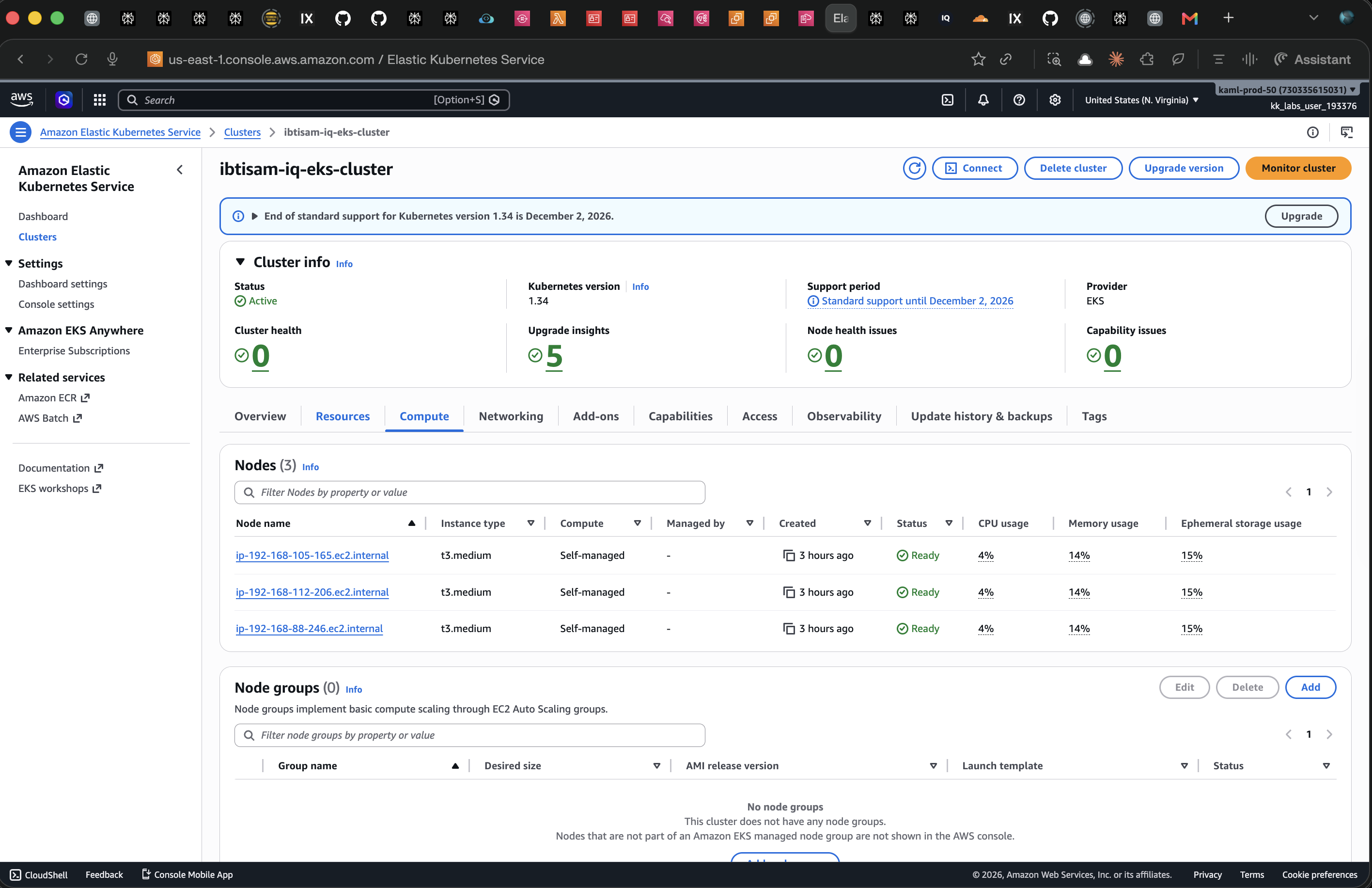
Verify Nodes
kubectl get nodes
# NAME                              STATUS   ROLES    AGE   VERSION
# ip-192-168-105-165.ec2.internal   Ready    <none>   79s   v1.34.8-eks-3385e9b
# ip-192-168-112-206.ec2.internal   Ready    <none>   78s   v1.34.8-eks-3385e9b
# ip-192-168-88-246.ec2.internal    Ready    <none>   82s   v1.34.8-eks-3385e9b