SonarQube Community Edition Rootfs: Code Quality Server Image Build and Integration for the Iximiuz Labs
Context
SonarQube Community Edition Rootfs is a production-grade SonarQube LTA image for iximiuz playgrounds. It runs SonarQube 26.2 on top of PostgreSQL 18, with Nginx as a reverse proxy, all managed by systemd, and cloudflared pre-installed for Cloudflare Tunnel custom-domain access.
The image runs three services (PostgreSQL, Nginx, SonarQube) in addition to the init oneshot, making lab-init.sh significantly more complex: it performs live database provisioning at every boot.
MicroVM Rootfs
This image is a microVM rootfs for the iximiuz Labs platform. The platform mounts it as a block device and boots it with its own kernel. systemd becomes PID 1 through the platform boot process. Do not attempt to validate systemd, service behavior, or SonarQube startup via docker run: use labctl instead (see Verification).
Quick Start
Skip the build and try it now: Launch SonarQube Playground ↗.
Click Start, and SonarQube plus PostgreSQL boot behind Nginx in the browser (allow two to three minutes for Elasticsearch to warm up). The rest of this page covers how the image itself is built.
All source artifacts:
| Artifact | Path |
|---|---|
| Dockerfile | iximiuz/rootfs/sonarqube/Dockerfile |
| Scripts | iximiuz/rootfs/sonarqube/scripts/ |
| Configs | iximiuz/rootfs/sonarqube/configs/ |
| Welcome banner | iximiuz/rootfs/sonarqube/welcome |
| CI Workflow | .github/workflows/build-sonarqube-rootfs.yml |
| iximiuz Manifest | iximiuz/manifests/sonarqube-server.yml |
Objectives
SonarQube Rootfs must:
- Provide SonarQube 26.2 CE (LTA) running as
sonaruser on PostgreSQL 18, on top ofubuntu-24-04-rootfs. - Boot in the sequence
lab-init→postgresql→nginx→sonarqubevia systemd, with SonarQube accessible on port 80 via Nginx on first boot. - Provision the PostgreSQL
sonarrole andsonarqubedatabase at runtime (idempotently) vialab-init.sh(never at build time). - Configure SonarQube via a baked-in
sonar.propertieswith pre-substituted port, JDBC credentials, JVM tuning, and Elasticsearch settings. - Apply Elasticsearch kernel parameters (
vm.max_map_count=524288,fs.file-max=131072) at both build time (written to/etc/sysctl.conf) and runtime (applied bylab-init.shviasysctl -w). - Provide
cloudflaredand clear setup instructions in the welcome banner. - Apply a limited
sudoprofile for thesonardaemon: service management and log inspection only. - Be built reproducibly via GitHub Actions and published as
ghcr.io/ibtisam-iq/sonarqube-rootfswithlatest,community, and26.2.0-communitytags.
Architecture / Conceptual Overview
This is a four-tier stack in a single microVM:
| Tier | Component | Details |
|---|---|---|
| OS + Tools | ubuntu-24-04-rootfs | systemd, SSH, ibtisam user, shell config, base tools |
| Data | PostgreSQL 18 | Via PGDG apt repo; DB provisioned at runtime by lab-init.sh |
| App | SonarQube 26.2 CE | /opt/sonarqube; sonar user; configured via sonar.properties |
| Edge | Nginx | Port 80 → 127.0.0.1:SONARQUBE_PORT; /health endpoint |
Boot Sequence
systemd (PID 1)
  └── lab-init.service  [oneshot, Before=all services]
        1. Generates SSH host keys (ephemeral per VM)
        2. Creates /run/sshd, /run/nginx, /run/postgresql
        3. Starts PostgreSQL cluster via pg_ctlcluster
        4. Waits up to 30s for PostgreSQL ready
        5. Creates role sonar (idempotent DO $$ block)
        6. Creates database sonarqube owned by sonar (shell-level idempotency check)
        7. Grants ALL PRIVILEGES on sonarqube to sonar
        8. Fixes /opt/sonarqube ownership (sonar:sonar)
        9. Applies: sysctl vm.max_map_count=524288, fs.file-max=131072
          ↓ (After= constraint)
  └── postgresql.service  [systemd-managed via PGDG]
          ↓
  └── nginx.service       [simple, daemon off]
        Listens on :80 → proxies to 127.0.0.1:SONARQUBE_PORT
          ↓
  └── sonarqube.service   [simple]
        /opt/sonarqube/bin/linux-x86-64/sonar.sh console
        Runs as sonar:sonar
        Requires=postgresql.service lab-init.service
        OOMScoreAdjust=-900; LimitNOFILE=131072; LimitNPROC=8192
Embedded Elasticsearch Requirements
SonarQube embeds an Elasticsearch node inside the same process. Elasticsearch requires vm.max_map_count ≥ 262144 (SonarQube recommends 524288) and fs.file-max ≥ 65536 (set to 131072 here). Both are applied at build time to /etc/sysctl.conf and re-applied at every boot by lab-init.sh because sysctl settings from /etc/sysctl.conf may not be loaded in the microVM's transient root filesystem.
Port and Config Substitution
__SONARQUBE_PORT__ is substituted via sed at build time in three places:
| File | What changes |
|---|---|
/opt/sonarqube/conf/sonar.properties | sonar.web.port=__SONARQUBE_PORT__ |
/etc/nginx/sites-available/sonarqube | upstream sonarqube { server 127.0.0.1:__SONARQUBE_PORT__ } |
$HOME/.welcome | Displayed URL in the welcome banner |
Note: Elasticsearch internal port is always 9001 (fixed in sonar.properties). Only the SonarQube web port is parameterized.
Key Decisions
Database provisioning at runtime, not build time: PostgreSQL cannot be initialized at Docker build time because the PostgreSQL cluster requires a live system with proper OS users, /run/postgresql, and a running postgres process. lab-init.sh performs all DB setup at each boot. The provisioning is idempotent: roles use DO $$ BEGIN IF NOT EXISTS ... END $$ blocks, and database creation checks pg_database before running CREATE DATABASE. This means re-running lab-init on an existing VM is safe.
pg_ctlcluster over service postgresql start: On Ubuntu/Debian, the postgresql systemd service is a "dummy" unit that wraps pg_ctlcluster. lab-init.sh calls pg_ctlcluster 18 main start directly for reliability inside the oneshot context, with a 30-second readiness poll before attempting any DB operations.
Elasticsearch sysctl applied twice: install-sonarqube.sh writes the values to /etc/sysctl.conf and /etc/security/limits.conf at build time. lab-init.sh applies them live via sysctl -w at every boot. The double application is intentional: the microVM may not read /etc/sysctl.conf during its boot process, so the runtime application via lab-init is the reliable path.
sonar.properties is a real config file, not a template: Unlike Jenkins and Nexus, SonarQube's configuration is complex enough to warrant a full configs/sonar.properties with all tunables explicitly set. Only sonar.web.port is parameterized. The file includes explicit JVM heap settings: - Web server: -Xmx1G -Xms256m -XX:+UseG1GC - Compute Engine (CE): -Xmx2G -Xms512m -XX:+UseG1GC - Elasticsearch: -Xms1G -Xmx1G (equal min/max to avoid heap resizing)
These are sized for the manifest's 10GiB RAM allocation.
Hardcoded JDBC credentials: sonar.properties has sonar.jdbc.username=sonar and sonar.jdbc.password=sonar_password. lab-init.sh creates the role with ENCRYPTED PASSWORD 'sonar_password'. This is intentional for a lab image: changing either requires updating both files. Do not use these credentials in any production-adjacent deployment.
sonarqube.service is Type=simple, not notify: SonarQube's startup script (sonar.sh console) does not implement sd_notify. Type=simple is correct. Requires=postgresql.service lab-init.service ensures systemd will not start SonarQube until both its data tier and the init oneshot are complete.
Limited sudo for sonar daemon: configs/sudoers.d/sonarqube-user grants the sonar system user passwordless access to: systemctl restart/stop/start/status sonarqube, systemctl restart/status postgresql, systemctl reload nginx, and journalctl. Unlike Jenkins and Nexus which only cover their own service, SonarQube's sudoers also includes PostgreSQL restart: because SonarQube depends on a running database and the sonar user may need to recover from a DB failure.
lab-init.service is Before=ssh,nginx,postgresql,sonarqube: It runs before all four. SSH host keys are regenerated per VM. /run/sshd, /run/nginx, and /run/postgresql are all wiped on boot. The PostgreSQL cluster start happens inside lab-init.sh directly, not through the postgresql.service dependency, because lab-init must both start PG and provision the DB before sonarqube.service launches.
BUILD_DATE and VCS_REF not passed as build-args in CI: Same known gap as Jenkins and Nexus. The workflow does not pass these as explicit build-args, so the Dockerfile LABEL block will produce empty OCI labels for created and revision.
Source Layout
sonarqube/
├── Dockerfile
├── README.md
├── welcome
├── configs/
│   ├── nginx.conf                      # client_max_body_size 64M; upstream __SONARQUBE_PORT__
│   ├── sonar.properties                # JDBC, web port, ES port=9001, JVM heap tuning
│   ├── sonarqube.service               # Type=simple; Requires=postgresql + lab-init
│   ├── sudoers.d/
│   │   └── sonarqube-user              # sonar daemon: service control + PG + journalctl
│   └── systemd/
│       └── lab-init.service            # oneshot: Before=ssh,nginx,postgresql,sonarqube
└── scripts/
    ├── install-postgresql.sh           # PG18 via PGDG apt repo; systemctl enable postgresql
    ├── install-sonarqube.sh            # Java 21 + SonarQube 26.2.0.119303; sysctl values
    ├── configure-nginx.sh              # Installs nginx, enables site, systemd override
    ├── lab-init.sh                     # SSH keys + /run dirs + PG start + DB provisioning + sysctl
    ├── healthcheck.sh                  # Build-time validation (10 sections)
    ├── customize-bashrc.sh             # sonar/pg/nginx aliases → ~/.bashrc
    └── install-cloudflared.sh          # Cloudflare Tunnel CLI
Build Arguments
| ARG | CI Default | Description |
|---|---|---|
USER | ibtisam | Interactive non-root user (inherited from base) |
SONARQUBE_PORT | 9000 | SonarQube web port (substituted in sonar.properties, nginx, welcome) |
BUILD_DATE | From CI metadata-action | OCI label: image creation timestamp |
VCS_REF | github.sha | OCI label: git commit SHA |
Prerequisites
ghcr.io/ibtisam-iq/ubuntu-24-04-rootfs:latestbuilt and published.- Local checkout of
github.com/ibtisam-iq/silver-stackwithiximiuz/rootfs/sonarqube/available. - Docker Buildx available locally, or a GitHub Actions runner with
docker/setup-buildx-action. - Network access to: PGDG apt repository (PostgreSQL),
binaries.sonarsource.com(SonarQube zip), Cloudflare apt repo (cloudflared). - For CI:
packages: writepermission to push to GHCR viasecrets.GITHUB_TOKEN.
Build Steps
1. Local Build
From iximiuz/rootfs/sonarqube/:
docker build \
  --build-arg USER="ibtisam" \
  --build-arg SONARQUBE_PORT=9000 \
  -t ghcr.io/ibtisam-iq/sonarqube-rootfs:latest \
  .
Note
BUILD_DATE and VCS_REF are injected by CI. Local builds do not require them.
The Dockerfile performs the following sequence in order:
Step 1: Inherit the base
FROM ghcr.io/ibtisam-iq/ubuntu-24-04-rootfs:latestUSER rootfor all installation steps- ARGs:
USER,SONARQUBE_PORT,BUILD_DATE,VCS_REF ENV:SONARQUBE_HOME=/opt/sonarqube,SONARQUBE_PORT=${SONARQUBE_PORT:-9000},JAVA_HOME,PATH(Java bin prepended),TZ=UTC
Note
SONARQUBE_PORT in ENV uses ${SONARQUBE_PORT:-9000}: a default fallback in case the ARG is not passed. This is different from Jenkins and Nexus, which do not use a default in the ENV assignment.
Step 2: Copy build-time scripts first
COPY scripts/ /opt/sonarqube-scripts/+chmod +x *.sh
Note
This is structurally different from Jenkins and Nexus: scripts are copied before config files because the install scripts are needed before sonar.properties and nginx.conf exist. The Dockerfile does not need nginx config for the first two RUN steps.
Step 3: Copy systemd units and sudoers
COPY configs/sonarqube.service /etc/systemd/system/sonarqube.serviceCOPY configs/sudoers.d/sonarqube-user /etc/sudoers.d/sonarqube-userCOPY configs/systemd/lab-init.service /etc/systemd/system/lab-init.service
Note
sonar.properties and nginx.conf are NOT copied here. They are copied in later steps after their target directories exist.
Step 4: Install PostgreSQL (install-postgresql.sh)
- Installs
postgresql-common(provides the PGDG repo setup script). - Runs
/usr/share/postgresql-common/pgdg/apt.postgresql.org.shnon-interactively to add the PGDG repository. - Installs
postgresql-18andpostgresql-contrib-18. - Runs
systemctl enable postgresql.
Step 5: Install Java 21 + SonarQube CE (install-sonarqube.sh ${SONARQUBE_PORT})
- Validates port argument.
- Installs
openjdk-21-jdkvia apt. - Downloads
sonarqube-26.2.0.119303.zipfrom Sonatype CDN. - Extracts to
/opt/sonarqube, removes zip. - Creates
sonarsystem user (--system --no-create-home --shell /bin/bash). - Sets ownership
sonar:sonar, permissions755on/opt/sonarqube. - Creates subdirectories:
/opt/sonarqube/{data,temp,logs}. - Writes to
/etc/sysctl.conf:vm.max_map_count=524288andfs.file-max=131072. - Writes to
/etc/security/limits.conf:sonar soft/hard nofile 131072,sonar soft/hard nproc 8192.
Step 6: Copy and configure sonar.properties
COPY configs/sonar.properties /opt/sonarqube/conf/sonar.properties
RUN sed -i "s/__SONARQUBE_PORT__/${SONARQUBE_PORT}/g" /opt/sonarqube/conf/sonar.properties && \
    chown sonar:sonar /opt/sonarqube/conf/sonar.properties
install-sonarqube.sh because /opt/sonarqube/conf/ is created by the install script. The chown ensures the sonar user can read it at runtime. Step 7: Copy and configure nginx.conf
COPY configs/nginx.conf /etc/nginx/sites-available/sonarqube
RUN sed -i "s/__SONARQUBE_PORT__/${SONARQUBE_PORT}/g" /etc/nginx/sites-available/sonarqube
/etc/nginx/sites-available/ exists from the base image's Nginx installation. Step 8: Configure Nginx (configure-nginx.sh)
- Installs
nginxvia apt (idempotent if already present). - Validates
/etc/nginx/sites-available/sonarqubeexists (COPY'd in Step 7). - Removes default site, enables sonarqube site symlink.
- Creates systemd override:
Type=simple,ExecStart=/usr/sbin/nginx -g 'daemon off;'. - Runs
nginx -tto validate config.
Step 9: Enable systemd units
systemctl enable lab-init
systemctl enable postgresql
systemctl enable nginx
systemctl enable sonarqube
Step 10: Build-time healthcheck (healthcheck.sh ${USER})
Validates 10 sections without starting services (systemd not running during build):
| Section | What is checked |
|---|---|
| 1. System tools | curl, wget, git, vim, unzip, nginx present |
| 2. Java | java, javac commands; JAVA_HOME set |
| 3. PostgreSQL | postgresql-18 package; psql command; postgres user; /var/lib/postgresql dir |
| 4. SonarQube installation | /opt/sonarqube/{bin,conf,data,logs} dirs; sonar.sh present; sonar user; /opt/sonarqube owned by sonar |
| 5. Nginx config | Site file present; symlink enabled; default removed; nginx -t passes |
| 6. Systemd units | lab-init, ssh, postgresql, nginx, sonarqube symlinks in multi-user.target.wants/ |
| 7. SSH config | sshd_config and sshd binary; host keys absent (expected: generated at boot) |
| 8. Users | Interactive $USER account; sudoers.d/sonarqube-user present |
| 9. File permissions | /opt/sonarqube owned by sonar |
| 10. Port config | sonar.properties has sonar.web.port=SONARQUBE_PORT; nginx config has 127.0.0.1:SONARQUBE_PORT |
Step 11: Install cloudflared (install-cloudflared.sh)
Step 12: Fix ownership
chown -R ${USER}:${USER} /home/${USER}
Step 13: User customizations
USER $USER+ENV HOME=/home/$USERCOPY welcome $HOME/.welcome→sed -ireplaces__SONARQUBE_PORT__customize-bashrc.shappends to~/.bashrc:sonar-status,sonar-logs,sonar-restart,sonar-start,sonar-stoppg-status,pg-logs,pg-restartnginx-status,nginx-logs,nginx-reload- Standard
ll,la,laliases
Step 14: Return to root + CMD
USER rootEXPOSE 22 80 ${SONARQUBE_PORT}CMD ["/lib/systemd/systemd"]
2. Build and Push via GitHub Actions
Canonical build: .github/workflows/build-sonarqube-rootfs.yml
Triggers:
pushtomainwhen files underiximiuz/rootfs/sonarqube/**(excludingREADME.md) or the workflow file change.- Pull requests with the same path filters.
- Manual
workflow_dispatch.
Key steps:
- Checkout repository.
- Set up Docker Buildx (no QEMU: amd64 only, intentional).
- Log in to GHCR via
secrets.GITHUB_TOKEN. - Extract metadata via
docker/metadata-action:- Tags:
latest,community,26.2.0-community(on default branch),sha-<short>,YYYY-MM-DD - Labels include
org.opencontainers.image.base.name=ghcr.io/ibtisam-iq/ubuntu-24-04-rootfs:latest
- Tags:
docker/build-push-actionwith:context: ./iximiuz/rootfs/sonarqubeplatforms: linux/amd64push: true(non-PR only)build-args: USER=ibtisam,SONARQUBE_PORT=9000- GHA layer cache enabled.
- Print final image digest.
Known gap
BUILD_DATE and VCS_REF are not passed as explicit build-args. Same issue as Jenkins and Nexus: the Dockerfile LABEL block produces empty OCI labels for created and revision.
Verification
✅ Correct: Inspect the Registry Image
skopeo inspect docker://ghcr.io/ibtisam-iq/sonarqube-rootfs:latest \
  | jq '{
      name: .Name,
      base: .Labels["org.opencontainers.image.base.name"],
      created: .Labels["org.opencontainers.image.created"],
      documentation: .Labels["org.opencontainers.image.documentation"],
      authors: .Labels["org.opencontainers.image.authors"]
    }'
✅ Correct: Binary and Config Presence Check (docker run: limited scope)
Confirms binaries, files, configs, and symlinks. Does not validate runtime behavior (no systemd, no PostgreSQL, no SonarQube):
docker run --rm ghcr.io/ibtisam-iq/sonarqube-rootfs:latest bash -c "
  java -version 2>&1 | head -1
  psql --version
  nginx -v 2>&1
  cloudflared --version

  echo '--- SonarQube binary ---'
  ls -lh /opt/sonarqube/bin/linux-x86-64/sonar.sh

  echo '--- sonar.properties (port + jdbc) ---'
  grep -E 'sonar.web.port|sonar.jdbc' /opt/sonarqube/conf/sonar.properties

  echo '--- sonar.properties (ES + JVM heap) ---'
  grep -E 'sonar.search|sonar.ce.java|sonar.web.java' /opt/sonarqube/conf/sonar.properties

  echo '--- Nginx upstream port ---'
  grep server /etc/nginx/sites-available/sonarqube | head -3

  echo '--- Systemd unit symlinks ---'
  ls /etc/systemd/system/multi-user.target.wants/ | grep -E 'lab-init|postgresql|nginx|sonarqube'

  echo '--- sysctl.conf Elasticsearch limits ---'
  grep -E 'max_map_count|file-max' /etc/sysctl.conf

  echo '--- sudoers ---'
  cat /etc/sudoers.d/sonarqube-user

  echo '--- Welcome banner ---'
  cat /home/ibtisam/.welcome
"
✅ Correct: Full Runtime Verification (iximiuz microVM)
The only valid way to verify the full stack:
# Step 1: ensure labctl is authenticated
labctl auth whoami

# Step 2: download the manifest
curl -fsSL https://raw.githubusercontent.com/ibtisam-iq/silver-stack/main/iximiuz/manifests/sonarqube-server.yml \
  -o sonarqube-server.yml

# Step 3: create the playground
labctl playground create --base flexbox sonarqube-server -f sonarqube-server.yml
Once the VM is running, connect via the terminal tab:
# --- System health ---
systemctl is-system-running              # Expected: running
systemctl status lab-init                # Expected: active (exited): oneshot complete
systemctl status postgresql              # Expected: active (running)
systemctl status nginx                   # Expected: active (running)
systemctl status sonarqube               # Expected: active (running): may be activating for 2–3 min

# --- PostgreSQL database provisioned ---
sudo -u postgres psql -c '\l'           # sonarqube database should appear
sudo -u postgres psql -c '\du'          # sonar role should appear

# --- Nginx health endpoint ---
curl -s http://localhost:80/health       # Expected: healthy

# --- SonarQube API health (wait 2-3 min for full startup) ---
curl -s -u admin:admin http://localhost:9000/api/system/health
# Expected: {"health":"GREEN","causes":[]}

# --- Elasticsearch sysctl values ---
sysctl vm.max_map_count                  # Expected: 524288
sysctl fs.file-max                       # Expected: 131072

# --- Aliases available ---
alias | grep sonar-
alias | grep pg-
alias | grep nginx-
❌ Not Valid: docker run for systemd or service checks
docker run cannot start systemd, PostgreSQL, or SonarQube. Any attempt produces:
This is expected and correct; it is not a bug.
SonarQube Startup Time
SonarQube 26.2 with embedded Elasticsearch typically takes 2–3 minutes to fully start on first boot. systemctl status sonarqube will show activating during this period. Monitor with sonar-logs and wait for the log line SonarQube is operational before testing the UI or API.
Integration with iximiuz Labs
Quickest path
Open the playground directly in the browser and click Start Playground: https://labs.iximiuz.com/playgrounds/SilverStack-sonarqube-server-7761f36f No local tools required. The labctl steps below are for launching via manifest.
Prerequisites
Before proceeding, ensure the following are in place on the machine from which labctl commands will run:
labctlis installedlabctlis authenticated Verify the session:
Step 1: Create the playground
Download the manifest directly without cloning the full repository:
curl -fsSL https://raw.githubusercontent.com/ibtisam-iq/silver-stack/main/iximiuz/manifests/sonarqube-server.yml \
  -o sonarqube-server.yml
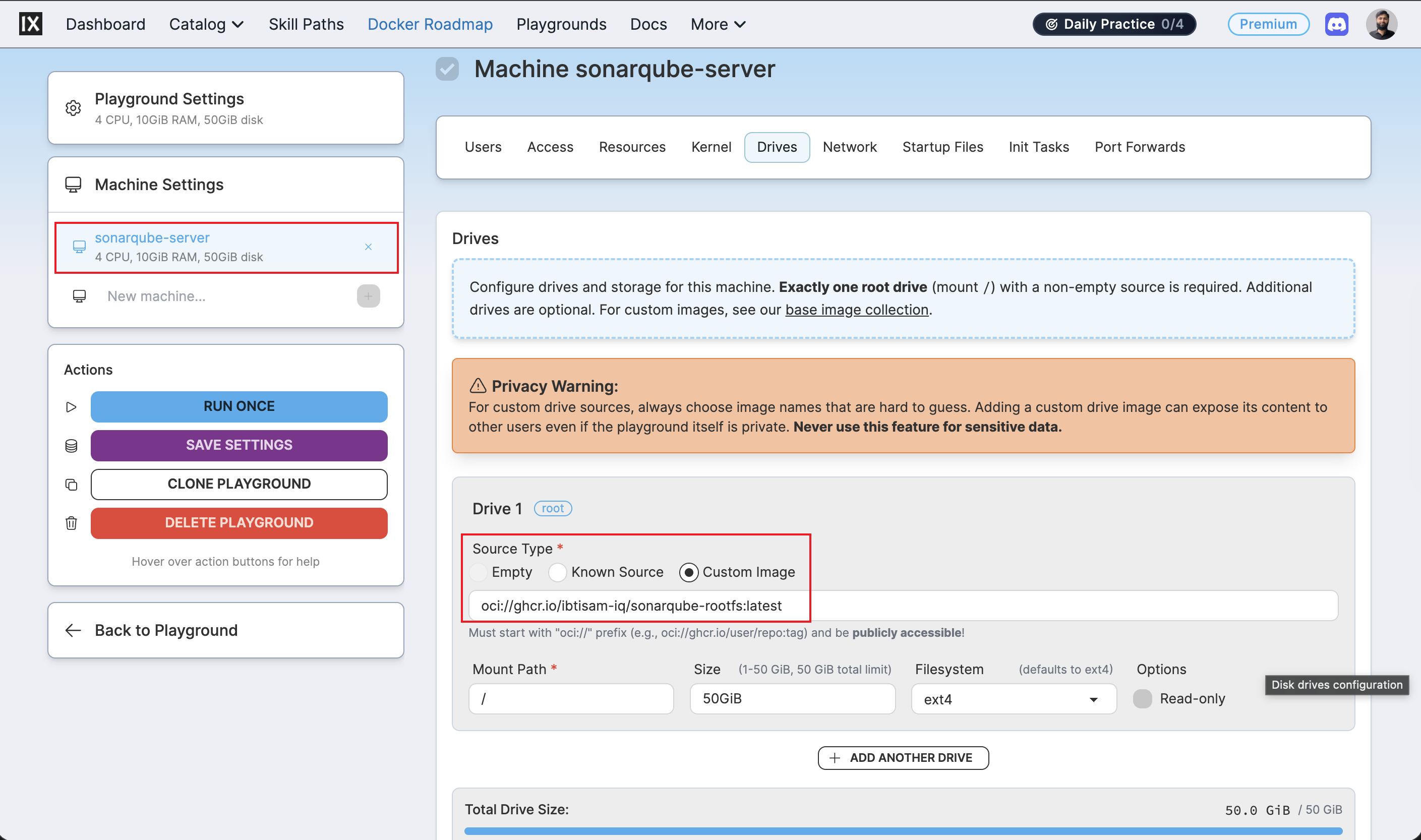
The manifest declares a single machine sonarqube-server whose root drive is mounted directly from the published GHCR image:
The manifest can be edited before running: for example, to adjust cpuCount, ramSize, or size to match account quota or preferences.
Run labctl playground create pointing at the local manifest:
When the command succeeds, labctl prints the playground URL and its unique ID:
Creating playground from /Users/ibtisam-iq/gitHub/silver-stack/iximiuz/manifests/sonarqube-server.yml
Playground URL: https://labs.iximiuz.com/playgrounds/SilverStack-sonarqube-server-7761f36f
SilverStack-sonarqube-server-7761f36f
Note
The playground does not appear under Playgrounds: Running. Custom playgrounds created via labctl appear under Playgrounds: My Custom.
Step 2: Open the playground
Click the URL printed by labctl, or navigate manually:
- Open labs.iximiuz.com/dashboard.
- In the dashboard navigation bar, click Playgrounds.
- Under Playgrounds, click the My Custom tab.
- Locate the playground by the
titleset in the manifest file (e.g.,SilverStack SonarQube Server). If the manifest title was customized before running, look for that name instead. - The playground card shows a Start button and a three-dot menu (⋮).
To start immediately, click Start.
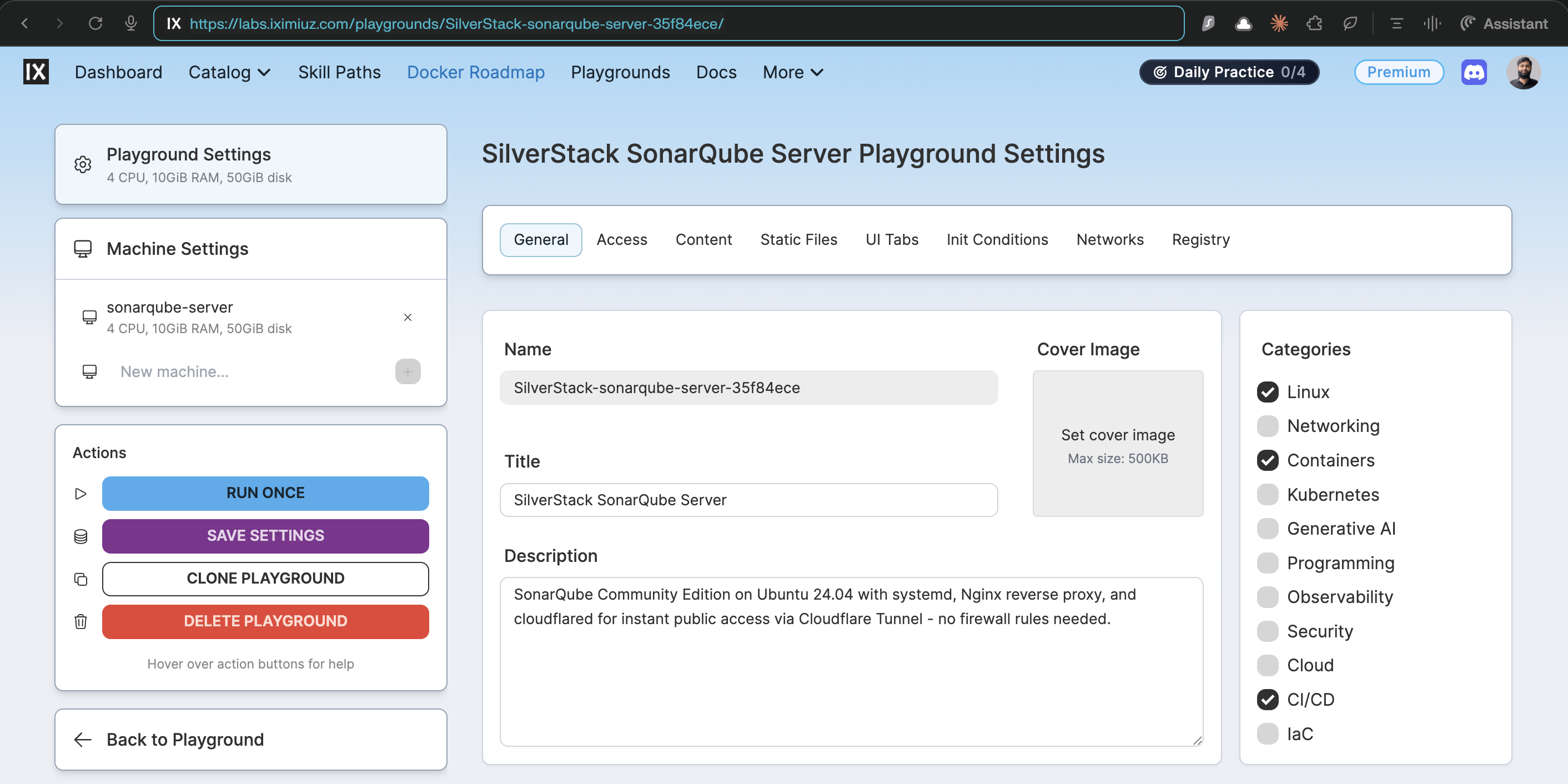
To review or adjust settings before starting, click ⋮ → Configure. This opens the Playground Settings page where machine drives, resources, network, and UI tabs can be inspected before launch.
Step 3: Verify the running playground
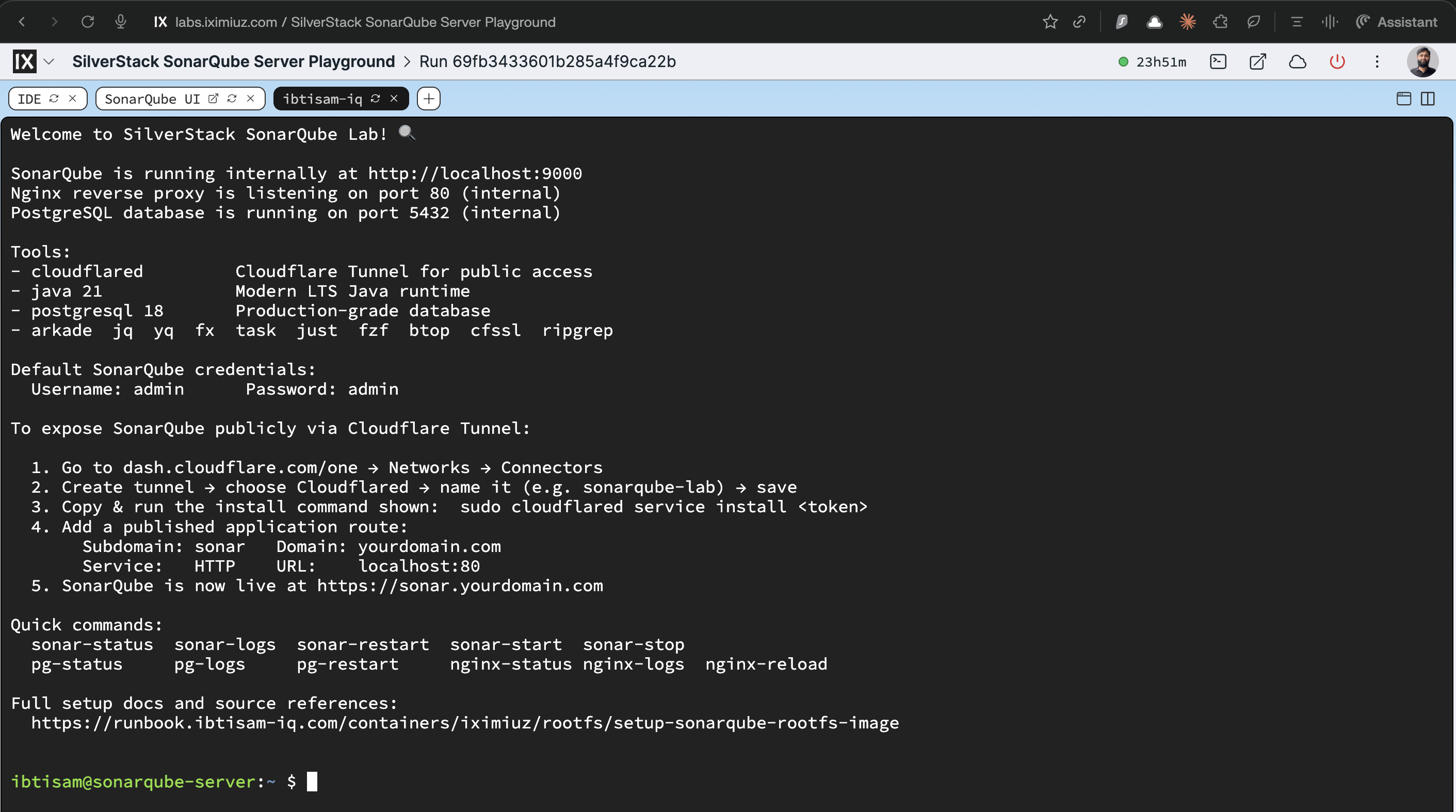
Once started, the welcome banner is displayed automatically and shows the configured internal ports, service status commands, and next steps.
Follow the instructions in the welcome file for post-setup tasks: iximiuz/rootfs/sonarqube/welcome
Cloudflare Tunnel Configuration
To expose the service on a custom public domain, cloudflared is already installed in the image. The welcome page includes step-by-step instructions for configuring and connecting the tunnel. Follow those instructions on first login.
If any issues arise during Cloudflare Tunnel setup, refer to phase 4 in the following runbook:
Related Reading
📖 self-hosted-cicd-stack-journey-from-ec2-to-iximiuz-labs.md