Dev Machine Rootfs: DevOps Workstation Image Build and Integration for the Iximiuz Labs
Context
Dev Machine Rootfs is a production-grade DevOps workstation image for iximiuz playgrounds, built on top of ubuntu-24-04-rootfs.
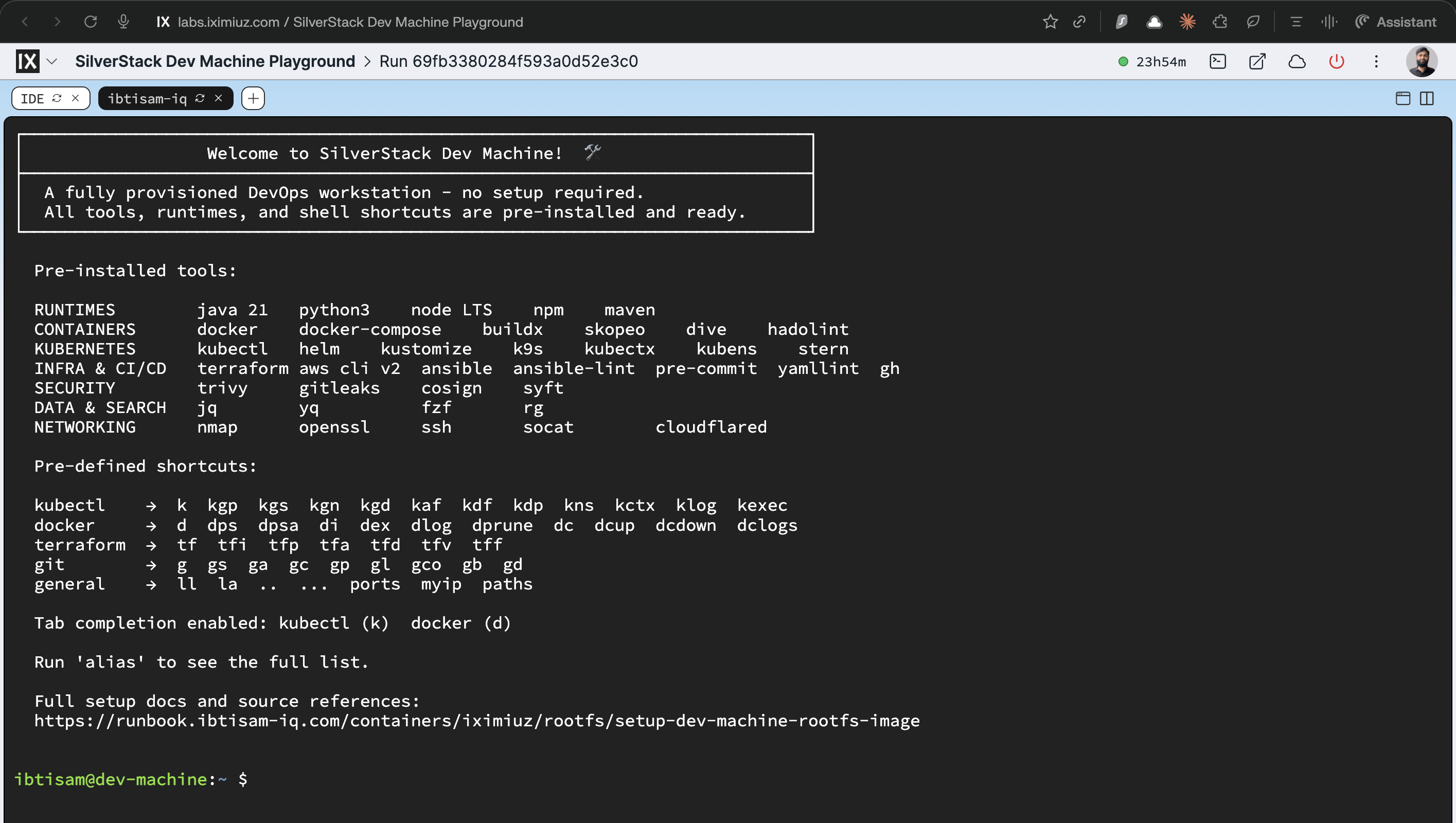
It turns the generic Ubuntu base into a fully provisioned environment with Docker, Kubernetes tooling, Terraform, AWS CLI, Ansible, security scanners, and an aggressive alias/completion setup aimed at day-to-day platform work.
This image is a microVM rootfs for the iximiuz Labs platform. The platform mounts it as a block device and boots it with its own kernel. systemd becomes PID 1 through the platform boot process, not through Docker. Running the image with
docker runwill not produce a working systemd, Docker daemon, or network services - see Verification for the correct approach.
All source artifacts live under:
| Artifact | Path |
|---|---|
| Dockerfile | iximiuz/rootfs/dev/machine/Dockerfile |
| Scripts | iximiuz/rootfs/dev/machine/scripts/ |
| Welcome banner | iximiuz/rootfs/dev/machine/welcome |
| CI Workflow | .github/workflows/build-dev-machine-rootfs.yml |
| iximiuz Manifest | iximiuz/manifests/dev-machine.yml |
Objectives
Dev Machine Rootfs must:
- Provide a single interactive DevOps workstation image that boots instantly on iximiuz.
- Inherit a stable, systemd-enabled Ubuntu 24.04 environment from
ubuntu-24-04-rootfs. - Pre-install the full SilverStack toolchain - Docker, Kubernetes CLIs, IaC tools, security scanners, and utilities - matching the versions in the Dev Machine README.
- Configure aliases and bash completions so
k,d, and other shortcuts behave identically to their full commands. - Ship a Dev Machine-specific welcome banner documenting all tools, shortcuts, and ephemerality.
- Be built reproducibly via GitHub Actions, tagged and pushed to GHCR as
ghcr.io/ibtisam-iq/dev-machine-rootfs.
Architecture / Conceptual Overview
Dev Machine Rootfs is intentionally workstation-only: it does not introduce systemd services of its own. It is a pure interactive DevOps environment layered on top of ubuntu-24-04-rootfs.
All installation work is split into focused scripts:
| Script | Purpose |
|---|---|
install-docker.sh | Installs Docker CE from the official Docker apt repo; enables docker.service; adds $USER to docker group |
install-tools.sh | 27-phase installation: runtimes, Kubernetes CLIs, IaC tools, security scanners, utilities |
install-cloudflared.sh | Installs Cloudflare Tunnel CLI from the official Cloudflare apt repo |
setup-completions.sh | Writes bash + zsh completions for all CLIs into /etc/bash_completion.d/ (system-wide) |
customize-bashrc.sh | Appends kubectl, docker, terraform, git, and utility aliases to ~/.bashrc |
Key Decisions
-
No systemd services - systemd services belong to the base and service images; Dev Machine is a pure interactive workstation.
-
amd64-only build - QEMU and arm64 are intentionally omitted. The CI workflow builds
linux/amd64exclusively. This is a known limitation: Dev Machine cannot run on arm64 iximiuz hosts. -
install-tools.shusesCOPY, not bind mount -install-tools.shrunsrm -rf /tmp/*in its PHASE 27 final cleanup. A bind mount would causermto target a live mount point, producing undefined behavior.COPYplaces the script in a real image layer that can be safely deleted. All other scripts use bind mounts because they do not delete/tmp/. -
welcomefile placement -COPY welcome $HOME/.welcomeruns after all other install steps.customize-bashrc.shappends logic to~/.bashrcthat displays and deletes~/.welcomeon first interactive login. The file must exist after all RUN layers complete - but it must not be consumed by a non-interactive build step. Placing it last guarantees it survives the build. -
BUILD_DATEandVCS_REFinjected by CI - the workflow passes these as build-args fromdocker/metadata-actionoutput andgithub.sha, respectively. Local builds may omit them; the OCI labels will be empty strings, which is acceptable for local testing only. -
USER $USERat the end is intentional - do not change it toUSER root
The Dockerfile ends with USER $USER, not USER root. This is a deliberate decision, not an oversight. Understanding why requires distinguishing the two completely independent execution contexts this image is used in:
| Context | Who controls the starting user | Effect of USER directive |
|---|---|---|
docker run binary check | Docker daemon, reads USER from OCI image config | Matters - process starts as ibtisam |
| iximiuz microVM boot | Platform kernel + systemd as PID 1 | Irrelevant - USER field is never read |
When iximiuz boots this image, it mounts the filesystem as a block device, boots it with its own kernel, and systemd becomes PID 1 entirely independent of anything in the OCI image config. The USER directive is an OCI image config field - it only tells docker run which user to start the process as. It has zero effect on the microVM boot.
Ending at USER $USER is correct for both reasons:
- For
docker runbinary checks: the process starts asibtisam. This correctly validates that all tools are accessible to the non-root interactive user - the user who will actually use them inside the VM. If the Dockerfile ended withUSER root, the binary check would pass even if a tool were installed in a location only root can reach, masking real permission issues. - For microVM boot: completely irrelevant. systemd boots as root via the platform kernel regardless of this directive.
Adding USER root before EXPOSE 22 would be a regression: it makes docker run checks run as root, silently hides permission problems, and provides zero benefit for the actual iximiuz runtime.
Source Layout
dev/machine/
├── Dockerfile
├── README.md
├── welcome
└── scripts/
    ├── customize-bashrc.sh
    ├── install-cloudflared.sh          # Uses COPY - deletes /tmp/*
    ├── install-docker.sh               # Uses bind mount (does not delete /tmp/)
    ├── install-tools.sh                # Uses COPY - deletes /tmp/* in PHASE 27
    ├── install-tools-all.sh            # Reference/dev script - NOT called in build
    └── setup-completions.sh            # Uses bind mount (does not delete /tmp/)
Build Arguments
| ARG | CI Default | Description |
|---|---|---|
USER | ibtisam | Non-root interactive user (inherited from base) |
BUILD_DATE | From docker/metadata-action | OCI label: image creation timestamp |
VCS_REF | github.sha | OCI label: git commit SHA |
Prerequisites
ghcr.io/ibtisam-iq/ubuntu-24-04-rootfs:latestis built and published (theFROMreference).- Local checkout of
github.com/ibtisam-iq/silver-stackwithiximiuz/rootfs/dev/machineavailable. - Docker Buildx available locally, or a GitHub Actions runner with
docker/setup-buildx-action. - For CI:
packages: writepermission to push to GHCR viasecrets.GITHUB_TOKEN.
Build Steps
1. Local Build
From the iximiuz/rootfs/dev/machine/ directory:
IMAGE_NAME="ghcr.io/ibtisam-iq/dev-machine-rootfs:latest"

docker build \
  --build-arg USER="ibtisam" \
  -t "${IMAGE_NAME}" \
  .
BUILD_DATEandVCS_REFare injected by CI. Local builds do not require them.
The Dockerfile performs the following sequence:
Step 1 - Inherit the base
FROM ghcr.io/ibtisam-iq/ubuntu-24-04-rootfs:latest- inherits systemd, SSH,$USERaccount, shell config, and base toolset.USER rootis set for all installation steps.
Step 2 - Install Docker CE (install-docker.sh via bind mount)
- Adds the official Docker apt repository.
- Installs
docker-ce,docker-ce-cli,containerd.io,docker-buildx-plugin,docker-compose-plugin. - Writes
/etc/docker/daemon.json(registry mirror for faster pulls). - Runs
systemctl enable docker- daemon starts automatically on VM boot, not during build. - Adds
$USERto thedockergroup. - Installs bash completion for
dockerinto/etc/bash_completion.d/docker.
Step 3 - Install DevOps toolchain (install-tools.sh via COPY)
- PHASE 1: Base packages (tmux, nano, nmap, socat, maven, git-lfs, openssl, etc.)
- PHASE 2: Java 21 (
openjdk-21-jdk) - PHASE 3: Python 3 + pip3 + venv + dev headers
- PHASE 4: Node.js LTS (NodeSource repo)
- NOTE: Docker CE was already installed by Step 2 (PHASE 5 is skipped)
- PHASE 6: kubectl v1.32 (official Kubernetes apt repo)
- PHASE 7: Helm (official install script)
- PHASE 8: Terraform (HashiCorp apt repo)
- PHASE 9: GitHub CLI (
gh) - PHASE 10: AWS CLI v2 (official installer)
- PHASE 11: Skopeo
- PHASE 12: k9s v0.50.10
- PHASE 13: kubectx + kubens v0.9.5
- PHASE 14: kustomize v5.7.1
- PHASE 15: stern v1.33.0
- PHASE 16: jq v1.8.1
- PHASE 17: yq v4.46.1
- PHASE 18: fzf v0.65.2
- PHASE 19: ripgrep v14.1.1
- PHASE 20: dive v0.13.1
- PHASE 21: hadolint v2.12.0
- PHASE 22: trivy v0.64.1
- PHASE 23: gitleaks v8.28.0
- PHASE 24: cosign v3.0.3
- PHASE 25: syft v1.26.1
- PHASE 26: pip tools (pre-commit, ansible, ansible-lint, yamllint)
- PHASE 27: Final cleanup -
rm -rf /var/lib/apt/lists/* /tmp/* /var/tmp/*
Step 4 - Install cloudflared (install-cloudflared.sh via COPY)
- Adds the Cloudflare apt repository.
- Installs
cloudflared.
Step 5 - Set up completions (setup-completions.sh via bind mount)
- Writes bash and zsh completions for all CLIs into
/etc/bash_completion.d/and/usr/share/zsh/vendor-completions/. - Tools covered: kubectl, helm, terraform, docker, gh, aws, kustomize, stern, kubectx/kubens, yq, trivy, cosign, syft, ansible, pre-commit, pip3, npm.
Step 6 - Fix ownership
chown -R ${USER}:${USER} /home/${USER}- corrects ownership of any files root wrote into the user's home during steps 2–5.
Step 7 - User customizations (order matters)
USER $USERandENV HOME=/home/$USERCOPY welcome $HOME/.welcome- placed at this stage so the banner is not consumed by any non-interactive build step.customize-bashrc.sh(bind mount) - appends kubectl, docker, terraform, git, and utility aliases and helpers to~/.bashrc.EXPOSE 22- documents the SSH port for iximiuz port-forwarding. SSH itself is managed by systemd inherited from the base image.
Note: The Dockerfile intentionally ends at
USER $USER- notUSER root. See Key Decisions →USER $USERat the end is intentional for the full explanation.
2. Build and Push via GitHub Actions
The canonical build runs via .github/workflows/build-dev-machine-rootfs.yml.
Triggers:
pushtomainwhen files underiximiuz/rootfs/dev/machine/**(excludingREADME.md) or the workflow file change.- Pull requests touching the same paths.
- Manual
workflow_dispatch.
Key steps:
- Checkout repository.
- Set up Docker Buildx (no QEMU - amd64 only, intentional).
- Log in to GHCR via
secrets.GITHUB_TOKEN. - Extract metadata via
docker/metadata-action- generates tags (latest,sha-*,YYYY-MM-DD) and OCI labels includingorg.opencontainers.image.base.name. docker/build-push-actionwith:context: ./iximiuz/rootfs/dev/machineplatforms: linux/amd64push: true(non-PR only)build-args: USER=ibtisam,BUILD_DATE(from metadata-action),VCS_REF(github.sha)- GHA layer cache enabled.
- Print final image digest.
Verification
✅ Correct: Inspect the Registry Image
After a CI push or manual docker push:
skopeo inspect docker://ghcr.io/ibtisam-iq/dev-machine-rootfs:latest \
  | jq '{
      name:          .Name,
      base:          .Labels["org.opencontainers.image.base.name"],
      created:       .Labels["org.opencontainers.image.created"],
      documentation: .Labels["org.opencontainers.image.documentation"],
      authors:       .Labels["org.opencontainers.image.authors"]
    }'
✅ Correct: Binary Presence Check (docker run - limited scope)
docker run with /bin/bash confirms that binaries are present on PATH. It does not validate runtime behavior (no systemd, no docker daemon, no SSH, no network services):
docker run --rm \
  ghcr.io/ibtisam-iq/dev-machine-rootfs:latest \
  bash -c "
    java -version 2>&1 | head -1
    python3 --version && pip3 --version
    node --version && npm --version
    mvn -version 2>&1 | head -1
    docker --version
    kubectl version --client --short 2>/dev/null || kubectl version --client
    helm version --short
    kustomize version
    k9s version
    stern --version
    terraform version | head -1
    aws --version
    ansible --version | head -1
    pre-commit --version
    trivy --version | head -1
    gitleaks version
    cosign version
    syft --version
    jq --version
    yq --version
    fzf --version
    rg --version
    cloudflared --version
  "
This confirms binaries are installed and accessible. It does not confirm that
docker.service,ssh.service, or any other systemd service is working. Errors likeCannot connect to the Docker daemonare expected and correct here.
✅ Correct: Full Runtime Verification (iximiuz microVM)
The only valid way to verify runtime behavior is to boot the image in an iximiuz microVM:
# Step 1 - ensure labctl is installed and authenticated
labctl auth whoami

# Step 2 - download the manifest
curl -fsSL https://raw.githubusercontent.com/ibtisam-iq/silver-stack/main/iximiuz/manifests/dev-machine.yml \
  -o dev-machine.yml

# Step 3 - create the playground
labctl playground create --base flexbox dev-machine -f dev-machine.yml
Once the VM is running, connect via the terminal provided by iximiuz or labctl ssh, then:
# System health
systemctl is-system-running          # Expected: running
systemctl status docker              # Expected: active (running)
systemctl status ssh                 # Expected: active (running)

# Shell config
echo $PS1                            # Expected: colored prompt
alias | grep "^alias k="             # Expected: alias k='kubectl'
alias | grep "^alias d="             # Expected: alias d='docker'

# Tool presence (quick check)
k version --client
d ps                                 # Expected: empty list, no daemon errors
tf version

# Welcome banner
cat ~/.welcome                       # Expected: Dev Machine banner (deleted after display)
❌ Not Valid: docker run for systemd or service checks
Running with docker run (even --privileged) will not produce a working systemd environment because the image has no CMD to start systemd. This is correct behavior - it confirms the image is purpose-built for microVM use.
Expected errors when attempting service checks via docker run:
System has not been booted with systemd as init system (PID 1). Can't operate.
Cannot connect to the Docker daemon at unix:///var/run/docker.sock
These are not bugs - they are expected and correct.
Integration with iximiuz Labs
Quickest path: open the playground directly in the browser and click Start Playground - https://labs.iximiuz.com/playgrounds/SilverStack-dev-machine-e672bcf7 - no local tools required. The
labctlsteps below are for launching via manifest.
Prerequisites
-
Install
labctl -
Authenticate
Step 1 - Download the Manifest
curl -fsSL https://raw.githubusercontent.com/ibtisam-iq/silver-stack/main/iximiuz/manifests/dev-machine.yml \
  -o dev-machine.yml
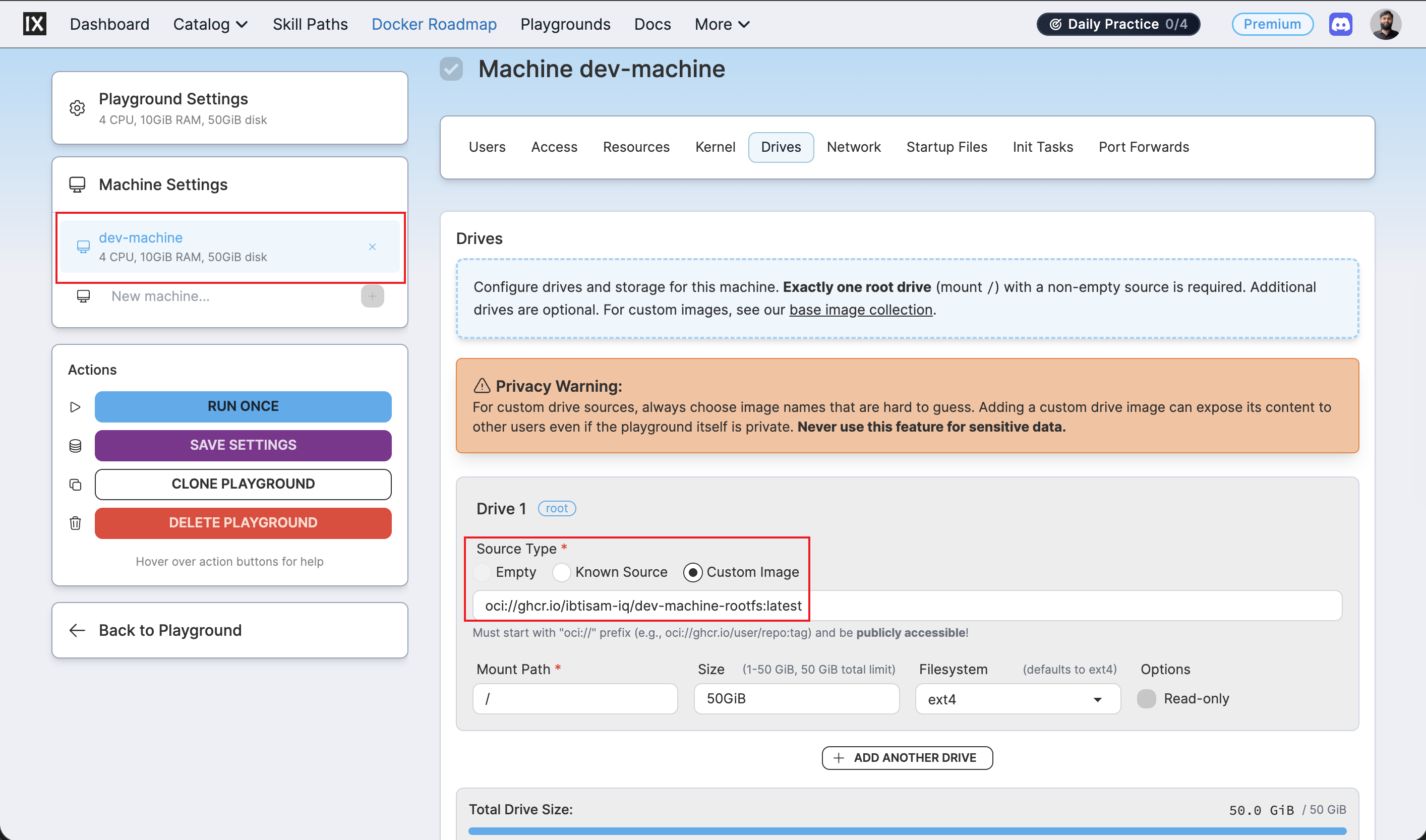
The manifest's drive source must reference the Dev Machine image:
Step 2 - Create the Playground
The playground appears under Playgrounds → My Custom, not under Playgrounds → Running.
Step 3 - Open and Verify
Navigate to the URL printed by labctl, or open the playground from labs.iximiuz.com/dashboard.
Once connected, run the runtime verification steps listed in Verification above.